Shadow mapping 🌑
Shadow mapping is the technique used to render shadows cast by lights.
It works by rendering the scene one more time, but from the point of view of the light. Instead of colors, this rendering stores the depth of each fragment - how far away the closest surface is. Then, when the scene is shaded for the camera, each fragment can compare its own depth from the light’s perspective to the stored depth. If the fragment is farther away, something is in front of it, and the fragment is in shadow.
In renderling shadow maps are rendered into textures stored in a shared
“shadow map atlas”. The size of the atlas can be configured with
Context::with_shadow_mapping_atlas_texture_size.
Example setup
We’ll continue with our marble bust scene, but this time we’ll add a ground plane for the bust’s shadow to land on, and a directional light to cast it:
    use renderling::{
        camera::Camera,
        context::Context,
        geometry::Vertex,
        glam::{Mat4, Vec3, Vec4},
        gltf::GltfDocument,
        light::{AnalyticalLight, DirectionalLight, Lux},
        primitive::Primitive,
        stage::Stage,
        types::GpuOnlyArray,
    };

    let ctx = Context::headless(512, 512).await;
    let stage: Stage = ctx
        .new_stage()
        .with_background_color(Vec4::new(0.25, 0.25, 0.25, 1.0));

    let _camera: Camera = {
        let aspect = 1.0;
        let fovy = core::f32::consts::PI / 4.0;
        let znear = 0.1;
        let zfar = 10.0;
        let projection = Mat4::perspective_rh(fovy, aspect, znear, zfar);
        let eye = Vec3::new(0.5, 0.5, 0.8);
        let target = Vec3::new(0.0, 0.3, 0.0);
        let up = Vec3::Y;
        let view = Mat4::look_at_rh(eye, target, up);

        stage
            .new_camera()
            .with_projection_and_view(projection, view)
    };

    // Load the marble bust, as in the lighting section.
    let model: GltfDocument<GpuOnlyArray> = stage
        .load_gltf_document_from_path(workspace_dir().join("gltf/marble_bust_1k.glb"))
        .unwrap()
        .into_gpu_only();

    // Add a ground plane for the bust's shadow to land on.
    let y = -0.01;
    let s = 2.0;
    let floor: Primitive = stage
        .new_primitive()
        .with_vertices(
            stage.new_vertices([
                Vertex::default()
                    .with_position([s, y, s])
                    .with_normal(Vec3::Y),
                Vertex::default()
                    .with_position([s, y, -s])
                    .with_normal(Vec3::Y),
                Vertex::default()
                    .with_position([-s, y, -s])
                    .with_normal(Vec3::Y),
                Vertex::default()
                    .with_position([s, y, s])
                    .with_normal(Vec3::Y),
                Vertex::default()
                    .with_position([-s, y, -s])
                    .with_normal(Vec3::Y),
                Vertex::default()
                    .with_position([-s, y, s])
                    .with_normal(Vec3::Y),
            ]),
        )
        .with_material(
            stage
                .new_material()
                .with_albedo_factor(Vec4::new(0.85, 0.85, 0.85, 1.0)),
        );

    // Create a directional light.
    let sun: AnalyticalLight<DirectionalLight> = stage
        .new_directional_light()
        .with_direction(Vec3::new(-0.4, -1.0, -0.6).normalize())
        .with_color(Vec4::ONE)
        .with_intensity(Lux::OUTDOOR_OVERCAST_HIGH);
Without shadows
Rendering the scene now gives us a well-lit bust, but no shadow:
    let frame = ctx.get_next_frame().unwrap();
    stage.render(&frame.view());
    let img_without_shadow = frame.read_image().await.unwrap();
    img_without_shadow.save("lighting/shadow-none.png").unwrap();
    frame.present();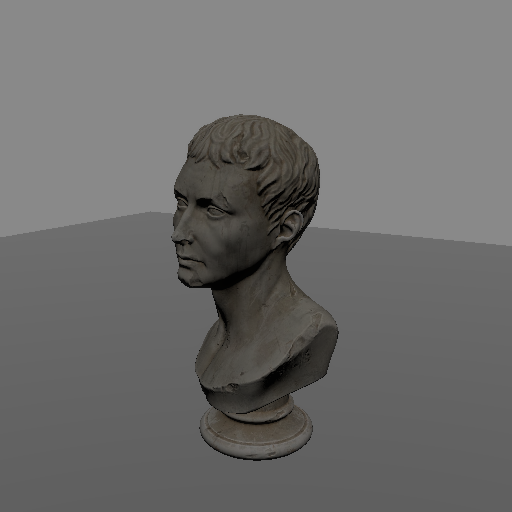
Notice how the ground is just as bright beneath the bust as it is everywhere else. The bust does not block the light at all.
Creating a shadow map
To cast shadows, we create a ShadowMap for our light using
Stage::new_shadow_map:
    use renderling::glam::UVec2;

    // Create a shadow map for the sun.
    //
    // The first argument is the light to cast shadows from. The `size`
    // determines the resolution of the shadow map - bigger maps give
    // crisper shadows but use more memory. `z_near` and `z_far` bound
    // the light's frustum - only objects within the frustum cast
    // shadows.
    //
    // Shadow maps are stored in a texture atlas shared by the whole
    // stage. The size of the atlas can be configured with
    // `Context::with_shadow_mapping_atlas_texture_size`.
    let shadow_map = stage
        .new_shadow_map(&sun, UVec2::splat(1024), 0.1, 10.0)
        .unwrap();
The size argument determines the resolution of the shadow map - bigger maps
give crisper shadows but use more memory. The z_near and z_far arguments
bound the light’s frustum - only objects within the frustum will cast shadows.
Updating the shadow map
A shadow map is a rendering of the scene, which means it has to be kept up to
date. Updating is done with ShadowMap::update, which takes the primitives
to render as shadow casters:
    // Update the shadow map by rendering the given primitives as shadow
    // casters, from the light's point of view.
    //
    // In a typical application this is done every frame, before
    // `Stage::render`.
    shadow_map
        .update(
            &stage,
            model.renderlets_iter().chain(std::iter::once(&floor)),
        )
        .unwrap();

    let frame = ctx.get_next_frame().unwrap();
    stage.render(&frame.view());
    let img_with_shadow = frame.read_image().await.unwrap();
    img_with_shadow.save("lighting/shadow.png").unwrap();
    frame.present();
In a typical application you will call ShadowMap::update every frame,
before Stage::render.
The ShadowMap holds a weak reference to the light it was created with, so
changes made to the light - like moving the sun across the sky - automatically
propagate to the shadow map on the next update.
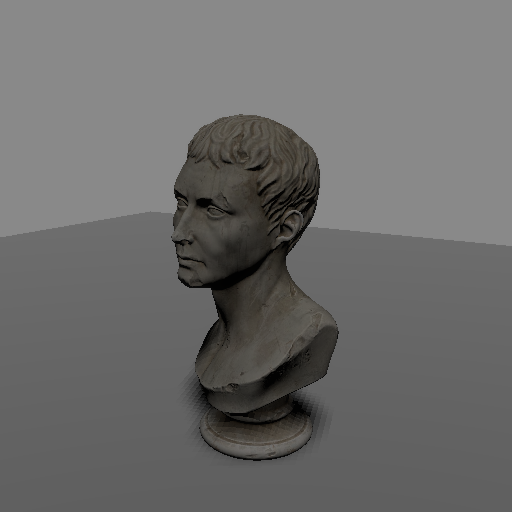
And just like that, our bust casts a shadow!
Tuning
Shadow maps have limited precision, which shows up as visual artifacts. The two most common are “shadow acne”, where surfaces end up shadowing themselves, and “peter panning”, where shadows detach from their casters. Both are controlled with the bias values on the shadow map’s descriptor:
    // Tune the shadow map by modifying its descriptor.
    //
    // The bias values compensate for the limited precision of the
    // shadow map. Too little bias causes "shadow acne", where surfaces
    // shadow themselves. Too much bias causes "peter panning", where
    // shadows detach from their casters.
    //
    // `pcf_samples` controls the softness of shadow edges through
    // percentage-closer filtering. Higher values are more expensive.
    {
        let mut desc = shadow_map.descriptor_lock();
        desc.bias_min = 0.0005;
        desc.bias_max = 0.005;
        desc.pcf_samples = 4;
    }

    // Update and render again to see the difference.
    shadow_map
        .update(
            &stage,
            model.renderlets_iter().chain(std::iter::once(&floor)),
        )
        .unwrap();

    let frame = ctx.get_next_frame().unwrap();
    stage.render(&frame.view());
    frame.present();
Increasing the bias values lifts surfaces out of their own shadow, fixing acne. Too much bias, though, and shadows start to detach from the objects casting them.
The pcf_samples field controls the softness of the shadow edges through
“percentage-closer filtering”. Higher values produce softer edges but cost
more texture samples.
Tips for making a good shadow map
- Make sure the map is big enough. A bigger map gives cleaner shadows, and can fix some peter panning issues even before playing with bias.
- Don’t set
pcf_samplestoo high. A high sample count can actually cause peter panning, and costs more. - Ensure
z_nearandz_farmake sense for your scene. If you find that shadows are cut off in a straight line, it’s likely one of them needs adjustment. - Expect point lights to be more expensive. A point light shadow map renders the scene from six points of view, one for each face of a cube around the light. To compensate for the lower per-face resolution, the number of percentage-closer filtering samples is forced to 16 for point lights.