Scene hierarchy 🌳
When objects must move together - wheels on a car, segments of a robot arm, planets around a sun - you want a hierarchy: change the parent, and the children come along for the ride.
In renderling that is the NestedTransform. Each node has a local
transform, relative to its parent. The node’s global transform is the
composition of every local transform up the chain, and it is recalculated
automatically whenever anything in the chain changes.
Building a hierarchy
Create nodes with Stage::new_nested_transform, position them with their
local_* builder methods, and link them with
NestedTransform::add_child. Then attach primitives with
Primitive::with_transform, handing the node a reference:
    use renderling::{
        camera::Camera,
        context::Context,
        glam::{Mat4, Quat, Vec3, Vec4},
        stage::Stage,
    };

    let ctx = Context::headless(512, 512).await;
    let stage: Stage = ctx
        .new_stage()
        .with_background_color(Vec4::new(0.25, 0.25, 0.25, 1.0));

    let _camera: Camera = {
        let aspect = 1.0;
        let fovy = core::f32::consts::PI / 4.0;
        let projection = Mat4::perspective_rh(fovy, aspect, 0.1, 100.0);
        let eye = Vec3::new(0.0, 2.0, 6.0);
        let target = Vec3::ZERO;
        let up = Vec3::Y;
        let view = Mat4::look_at_rh(eye, target, up);

        stage
            .new_camera()
            .with_projection_and_view(projection, view)
    };

    // Build a three-level hierarchy: root -> child -> grandchild.
    //
    // Each node has a _local_ transform, relative to its parent.
    let root = stage.new_nested_transform();
    let child = stage
        .new_nested_transform()
        .with_local_translation(Vec3::X * 1.2);
    let grandchild = stage
        .new_nested_transform()
        .with_local_translation(Vec3::X * 1.2);
    root.add_child(&child);
    child.add_child(&grandchild);

    // Attach a colored cube to each node. Primitives take the node's
    // _global_ transform, which is composed from the whole hierarchy.
    let cube = |color: Vec4| {
        stage
            .new_primitive()
            .with_vertices(stage.new_vertices(unit_cube()))
            .with_material(
                stage
                    .new_material()
                    .with_albedo_factor(color)
                    .with_has_lighting(false),
            )
    };
    cube(Vec4::new(0.6, 0.6, 0.6, 1.0)).with_transform(&root);
    cube(Vec4::new(0.0, 0.85, 0.85, 1.0)).with_transform(&child);
    cube(Vec4::new(0.95, 0.85, 0.1, 1.0)).with_transform(&grandchild);

    let frame = ctx.get_next_frame().unwrap();
    stage.render(&frame.view());
    let img_before = frame.read_image().await.unwrap();
    img_before.save("scene/hierarchy.png").unwrap();
    frame.present();
Note the cubes are all attached to nodes, not positioned directly. The cyan
cube sits at root * child, and the yellow one at root * child * grandchild.
Moving the parent moves the subtree
Because children are positioned relative to their parent, changing the parent moves everything below it:
    // Rotate the root - the entire hierarchy rotates with it, because
    // the child and grandchild are positioned relative to the root.
    root.set_local_rotation(Quat::from_axis_angle(Vec3::Y, core::f32::consts::FRAC_PI_4));

    let frame = ctx.get_next_frame().unwrap();
    stage.render(&frame.view());
    let img_parent = frame.read_image().await.unwrap();
    img_parent.save("scene/moved-parent.png").unwrap();
    frame.present();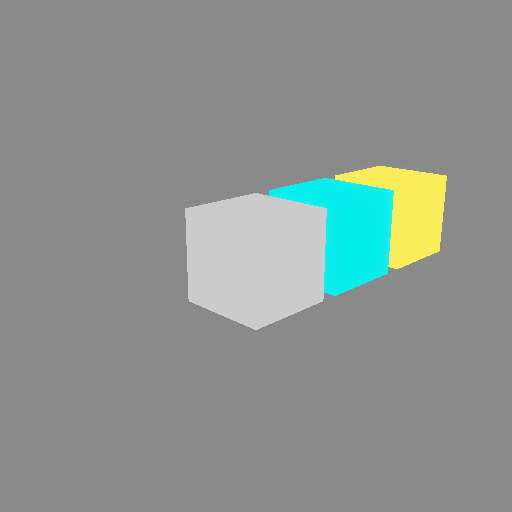
One rotation of the root carried the entire chain.
Moving a child moves only its subtree
Change a node’s local transform, and its parent stays put:
    // Move the child - the root stays put, and the grandchild follows the
    // child.
    child.set_local_translation(Vec3::new(1.2, 1.2, 0.0));

    let frame = ctx.get_next_frame().unwrap();
    stage.render(&frame.view());
    let img_child = frame.read_image().await.unwrap();
    img_child.save("scene/moved-child.png").unwrap();
    frame.present();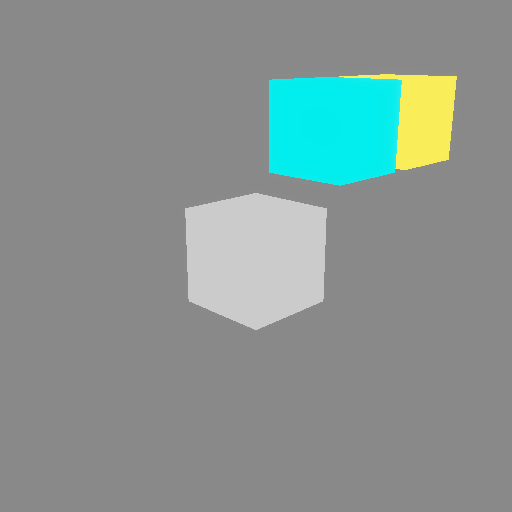
Notes
- Local vs global: the
local_*getters and setters work in the parent’s space. To inspect the composed result, useNestedTransform::global_descriptor, or walk the whole chain withNestedTransform::hierarchy. - Updates are immediate: changing a local transform (or the graph itself) recomputes the globals of the whole subtree right away, and the new globals sync to the GPU on the next render.
- Detaching:
NestedTransform::remove_childunlinks a node, which then keeps its own transform;NestedTransform::parentreturns the parent, if any. - Standalone objects that never need to follow anything can use the
simpler
TransformfromStage::new_transforminstead - that is what the earlier chapters used.